
Raise your own dragon: turn your documents into an AI model you own, without leaving RStudio. Point dragonfarm at your PDFs, Word files, web pages, or spreadsheets; check its answers against their sources; review the practice questions it writes; and train on your own GPU or a free cloud one. No Python to write, no API bill, and nothing leaves your machine unless you allow it.
transformers. A 7B dragon fits on an 8 GB
laptop GPU, and small ones learn fixed formats such as JSON in minutes.dragon_app() from any R session), and every step is also an R
function. Unsloth is built in: fine-tuning ran 1.5 to 2.8 times faster
than the standard trainer on the same 8 GB laptop.Using ellmer or ragnar? dragonfarm is the next step after RAG: training your own model from the same documents. Its tools also plug into ellmer and MCP.
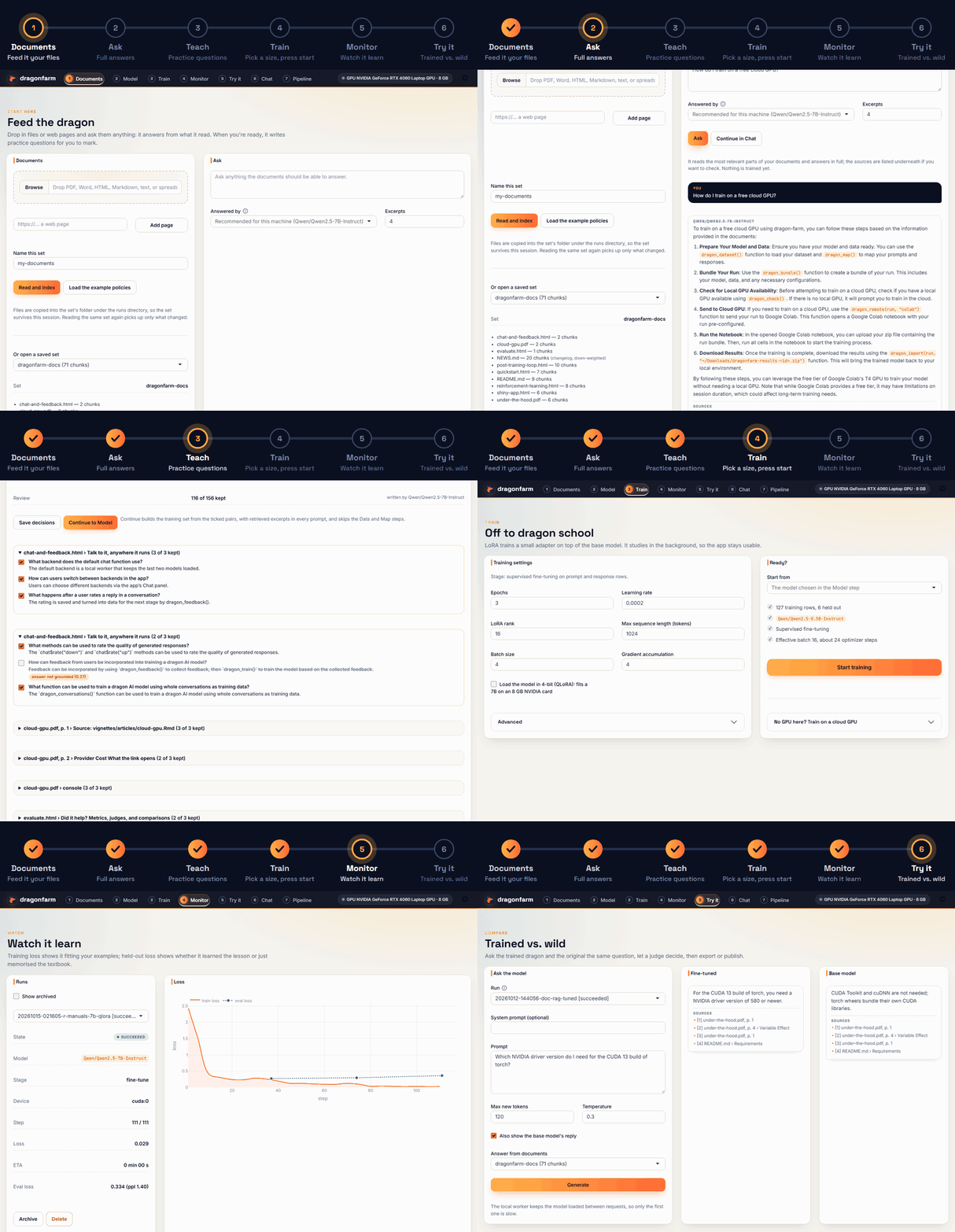
The app opens on documents and walks the same six steps as the GIF:
Already have a table of prompts and replies? One link switches the app to the table route: load the table, drag its columns into Prompt and Response slots, and carry on from Model.
# The current version, with documents and the new app, as a ready-built package:
install.packages("dragonfarm", repos = c("https://tejas4patel.r-universe.dev", "https://cloud.r-project.org"))

# or the CRAN release: install.packages("dragonfarm")
library(dragonfarm)
dragon_check()                   # first run builds the Python environment: about 3.7 GB
Or build it from GitHub with pak::pak("tejas4patel/dragonfarm"). Then open the
app with dragon_app().
You do not need a table of prompts and replies. Drop in documents, ask them questions, have a model write training questions from them, review those, and fine-tune with the retrieved excerpts in every prompt. In the app this is the Documents tab, the first one; in code:
docs <- dragon_documents(c("policies/", "https://example.com/help"), name = "support")
dragon_ask(docs, "How long is the return window?")   # answer with [1] [2] footnotes, no training

qa <- dragon_questions(docs)        # questions and answers per chunk, filtered, every one kept with a reason
dragon_questions_save(qa)           # after you have looked at them
run <- dragon_train(dragon_questions_dataset(qa, docs), "Qwen/Qwen2.5-7B-Instruct",
                    hardware = dragon_hardware(load_in_4bit = TRUE),   # QLoRA: fits an 8 GB GPU
                    args = dragon_train_args(max_seq_len = 1536, gradient_checkpointing = TRUE),
                    wait = TRUE)                     # about 4 hours for 600 pairs on a laptop RTX 4060
dragon_chat(run, documents = docs)$say("A customer wants to return an opened device.")
Retrieval does most of the work and a bigger answering model helps more than training does, so the default is to answer first and train second. The numbers behind that, and what to expect from each model size, are in From your documents to your model.
The table route, for data that already comes as prompt and response rows:
library(dragonfarm)
options(dragonfarm.runs_dir = "~/dragonfarm_runs")   # keep runs after R closes

run <- dragon_dataset(dragon_example_data()) |>
  dragon_map(prompt = "{subject}\n\n{body}", response = "reply") |>
  dragon_train("Qwen/Qwen2.5-0.5B-Instruct", wait = TRUE)

dragon_generate(run, "My thermostat keeps dropping off Wi-Fi.")
dragon_merge(run, "models/support-0.5b")
Runs live on disk, so you can close R and come back with
dragon_run("~/dragonfarm_runs/<run id>"), then dragon_status(),
dragon_wait(), dragon_cancel(), or dragon_resume(). By default a run goes
under a temporary folder that disappears when R closes, which is why the
example sets dragonfarm.runs_dir first (see ?dragon_runs_dir).
Qwen/Qwen2.5-0.5B-Instruct, before and after fine-tuning on 190 of the
package's example support tickets (training takes about 2 to 4 minutes on a
laptop RTX 4060 and about 4 minutes on a free Colab T4, after the one-time
setup). This ticket was not in the training data; it is the median of the 10
held-out tickets by word overlap with the reference reply. Temperature 0:
Ticket: Lumen bulb pack arrived damaged. Opened my Lumen bulb pack today and the casing is split. The packaging looked fine from the outside so it must have happened before shipping.
Base model: I'm sorry to hear that your Lumen bulb pack has been damaged. It's important to take any damage seriously and report it to the manufacturer or seller as soon as possible. Here are some steps you can follow: 1. Contact the Manufacturer: Reach out to the company that sold you the Lumen bulb pack. They may be able to provide a replacement or offer a repair service. 2. Report the Damage: ... (shortened)
After fine-tuning: I'm sorry your Lumen bulb pack arrived damaged. We will replace it at no cost. Please reply with a photo of the damage and one of the shipping label so we can file the carrier claim on our side. As soon as we have those, we ship a replacement Lumen bulb pack with a prepaid return label for the damaged unit. Usually a business day after the return is scanned in.
The policy and tone are right, but the last sentence mixes in a detail from another ticket type (the real policy is two business days). That is typical of small models, and a reason to review outputs before relying on them. The example tickets are also synthetic and built from templates, so this shows a model picking up a house style, not open-ended reliability. Measure on your own data.
A larger model fixes most of this, and an 8 GB card is enough for one.
Qwen/Qwen2.5-7B-Instruct loaded in 4-bit (dragon_hardware(load_in_4bit = TRUE), QLoRA) trained three epochs on the same tickets in about 22 minutes on
the RTX 4060 and, on held-out tickets, reproduced every policy the 0.5B had got
wrong or blended, including the two-business-day detail above. The numbers and
settings are in From your documents to your
model.
| I want to | Read |
|---|---|
| Go from documents to a model | From your documents to your model |
| Pick a model size for my task and GPU | Choosing a model size |
| Walk through the whole workflow | Quickstart |
| Use the app, or run it for other people | The dragonfarm app |
| Train without a local GPU | No GPU? Train in the cloud |
| Improve a model with judges, preference pairs, DPO | Fine-tune, judge, prefer, repeat |
| Train on rewards I can check (GRPO) | Reinforcement learning |
| Chat with a run and collect feedback | Talk to it, anywhere it runs |
| Measure whether it helped | Metrics, judges, and comparisons |
| Look up models, run files, and settings | Requirements, models, and settings |
| See it on regulatory guidance | Raise a regulatory dragon: FDA statistics guidance |
| Run it in a regulated team (records, sign-off, access) | For IT and quality teams |
| Install on a machine without the internet | Install without the internet |
R 4.1 or newer and about 3 GB of disk for the Python environment, which the
package sets up on first use. An NVIDIA GPU with 8 GB or more trains and runs
a 7B model in 4-bit (4-bit loading needs NVIDIA). Apple Silicon and smaller
GPUs train smaller models, and the smallest also run on a CPU. dragon_check() reports what it
found and how to fix it. Driver versions, GPU memory per model, and
environment variables are in
Requirements, models, and settings.
MIT. See LICENSE.md.